How to Reconcile Your Bank Account: A Step-by-Step Guide for Small Businesses
Bank reconciliation doesn't have to be painful. Here's exactly how to do it — and how to make it almost effortless with the right tools.
If you've ever stared at your bank statement and wondered why the number doesn't match what's in your accounting records, you're not alone. That gap between what your bank says and what your books say is precisely why bank reconciliation exists.
It's one of the most fundamental bookkeeping tasks there is. And yet, a surprising number of small business owners either skip it entirely or only do it when their accountant asks.
The good news? Bank reconciliation is straightforward once you understand the process. And with modern accounting software like Sage Accounting, much of the heavy lifting happens automatically. Let's walk through everything you need to know.
What Is Bank Reconciliation, Exactly?
Bank reconciliation is the process of comparing your internal financial records — your accounting books — against the transactions listed on your bank statement. The goal is simple: make sure both sides agree.
Your bank keeps its own record of every deposit, withdrawal, fee, and transfer that flows through your account. Meanwhile, your accounting system tracks the same transactions from your side — invoices you've sent, bills you've paid, expenses you've logged.
In a perfect world, these two records would match up at all times. In reality, they almost never do. There are timing differences, forgotten entries, bank fees you didn't know about, and the occasional plain old mistake.
In plain English: Bank reconciliation is checking that the money your bank says you have matches the money your books say you have — and working out why if it doesn't.
Think of it as balancing your chequebook, but for your entire business. It's how you make sure nothing's fallen through the cracks and that the financial picture you're looking at is actually accurate.
Why Bank Reconciliation Matters for Your Business
You might think, "My bank statement is right there — why do I need to double-check anything?" Fair question. But there are several important reasons reconciliation deserves a regular spot in your calendar.
You'll catch errors before they snowball
A mistyped invoice amount, a duplicated entry, a payment recorded against the wrong account — small errors like these are incredibly common. If you catch them within a week or two, they're easy to fix. Leave them for six months, and you're looking at a painful, time-consuming mess that could affect your tax return, VAT filing, or financial reports.
You'll spot fraud early
Unauthorised transactions, dodgy direct debits, or payments you didn't approve will show up during reconciliation. The sooner you notice, the sooner you can act. Many businesses only discover fraud months after the fact — often because they weren't reconciling regularly.
You'll have accurate cash flow visibility
You can't make smart spending, hiring, or investment decisions if you don't actually know how much money you have. Reconciliation gives you confidence that the balance you're looking at is real.
You'll stay compliant
HMRC expects your financial records to be accurate. With Making Tax Digital (MTD) for Income Tax starting in April 2026 for those earning over £50,000, having clean, reconciled records isn't optional — it's a legal requirement. Regular reconciliation makes tax time far less stressful.
"The businesses that reconcile regularly are the ones that sleep well at night. The ones that don't are the ones ringing their accountant in a panic every January."
How Often Should You Reconcile?
The short answer: at least monthly. The better answer: weekly, if you can manage it.
Monthly reconciliation is the absolute minimum for any business. It's what most accountants recommend, and it aligns with when you'll typically receive your bank statement. But if your business handles a high volume of transactions — say you're processing dozens of sales, payments, and expenses every week — monthly might not be frequent enough.
Weekly reconciliation takes far less time than you'd think, especially if you're only reviewing a handful of new transactions each time. It also means discrepancies get caught within days rather than weeks, which makes them much easier to investigate and resolve.
Frequency Best For Time Required Daily High-volume retail, hospitality, e-commerce 10–15 minutes Weekly Most small businesses, freelancers with regular clients 15–30 minutes Monthly Very small businesses, sole traders with few transactions 30–60 minutes Quarterly Not recommended — too many issues can pile up 2–4 hours (and a headache)
Tip: If you're using Sage Accounting with automatic bank feeds, daily reconciliation becomes almost effortless — the transactions are already there waiting for you to review and match.

What You Need Before You Start
Before you sit down to reconcile, gather a few things. Having everything to hand makes the process much smoother.
Your bank statement — either a paper statement, a PDF download, or a live feed from your bank. You need the full list of transactions for the period you're reconciling.
Your accounting records — this is your cashbook, ledger, or accounting software showing all the transactions you've recorded on your side.
The previous reconciliation — specifically, the closing balance from your last reconciliation. This becomes your starting point.
Any supporting documents — receipts, invoices, payment confirmations, and anything else that might help explain discrepancies.
If you're using cloud accounting software, most of this is already in one place. Your bank transactions get pulled in automatically, so you don't need to gather separate statements — everything's already sitting in the system ready to be matched.
The Step-by-Step Bank Reconciliation Process
Right, let's get into the actual process. Whether you're doing this manually in a spreadsheet or using software, the logic is the same.
Step 1: Compare the opening balances
Start by checking that the opening balance on your bank statement matches the closing balance from your last reconciliation. If these two numbers don't agree, stop right there — you've got an issue from a previous period that needs sorting first.
If this is your very first reconciliation, your opening balance in your books should match the balance on your bank statement from the date you started recording transactions.
Step 2: Go through the bank statement line by line
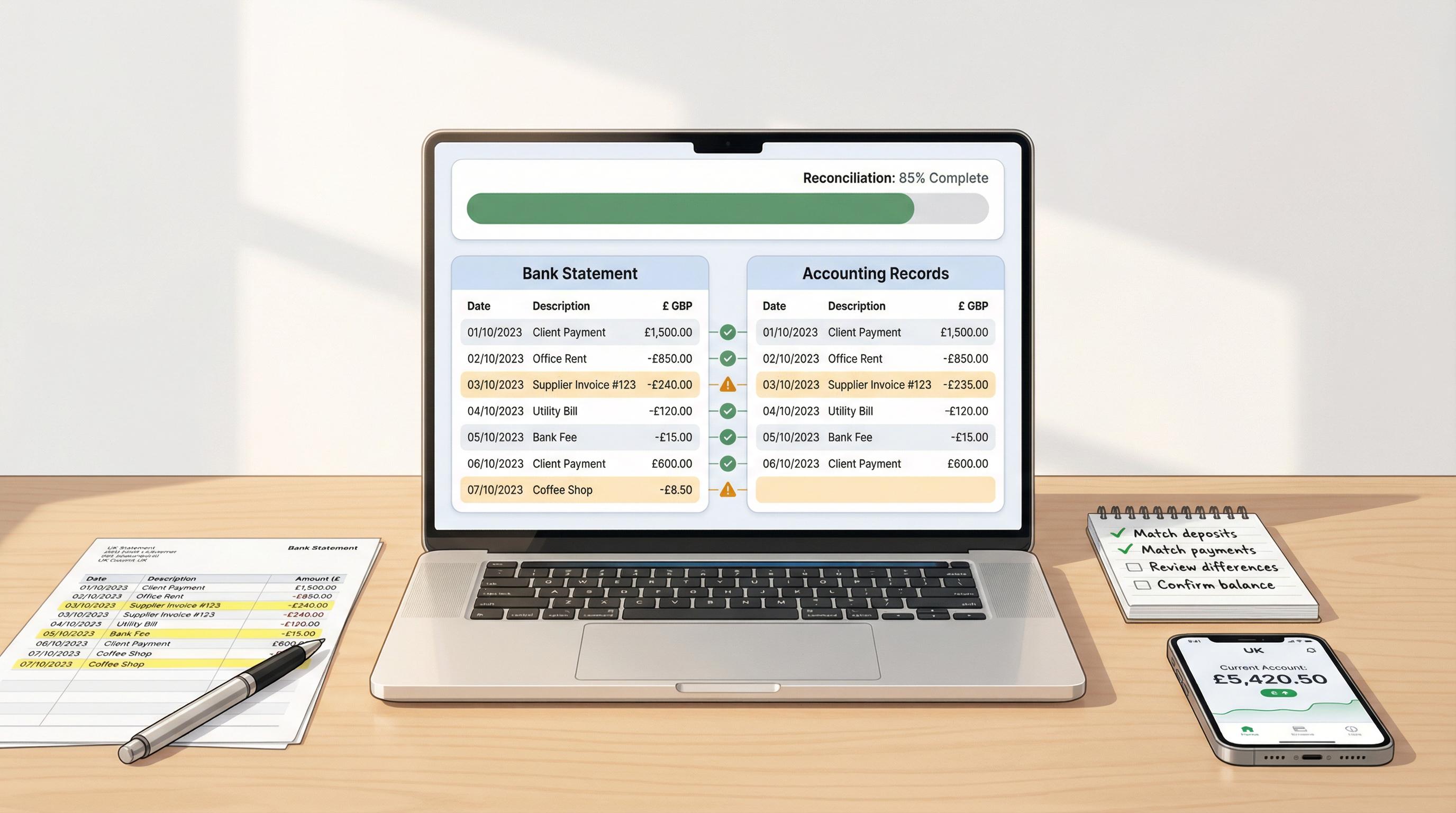
Work through every transaction on your bank statement and look for the matching entry in your accounting records. For each one, you're checking three things:
Does it exist in your books? — Is there a corresponding entry?
Is the amount correct? — Do the figures match exactly?
Is it categorised correctly? — Is it recorded against the right account?
Tick off each transaction as you go. A systematic approach helps — work from top to bottom, or sort by amount to match large transactions first.
Step 3: Go through your books for unmatched entries
Now work through the other direction. Look at your accounting records for any transactions that don't appear on the bank statement. These are typically:
Outstanding cheques — cheques you've written that haven't been cashed yet
Pending payments — bank transfers that haven't cleared
Deposits in transit — money you've received and recorded but that hasn't hit the bank yet
These timing differences are completely normal. They don't mean anything is wrong — just that the bank and your books are capturing the same transaction at slightly different times.
Step 4: Identify and investigate discrepancies
After steps 2 and 3, you'll likely have some items that don't match up. These need investigating. Common culprits include:
Bank fees or interest charges you haven't recorded
Direct debits or standing orders you forgot to enter
Transactions recorded at the wrong amount
Duplicate entries (the same transaction recorded twice)
Transactions recorded in the wrong period
For each discrepancy, work out what happened and why. Most of the time, it's something simple and fixable.
Step 5: Make the necessary adjustments
Once you've identified the cause of each discrepancy, update your accounting records accordingly. This might mean:
Adding missing transactions (bank fees, forgotten direct debits)
Correcting amounts that were entered incorrectly
Deleting or reversing duplicate entries
Reclassifying transactions to the correct account
Important: you're adjusting your books to match reality. Never adjust your bank statement — that's the factual record of what actually happened.
Important: Never alter your bank statement figures. Your books should be adjusted to reflect the bank's reality, not the other way round. If you think the bank has made an error, contact them directly to investigate.
Step 6: Confirm the balances match
After making your adjustments, recalculate. Your adjusted book balance should now equal your bank statement balance. If it does — congratulations, you're reconciled. If it doesn't, you'll need to go back and look for what you've missed.
Here's the formula in its simplest form:
Bank Statement Balance
− Outstanding cheques and payments
+ Deposits in transit
= Adjusted Bank Balance
Book Balance
+ Interest earned / credits not yet recorded
− Bank fees / debits not yet recorded
= Adjusted Book Balance
When both adjusted balances match, you're done. ✓
Step 7: Document and file
Once the balances agree, save or print the reconciliation. Keep a record of the reconciled balance, the date, and any adjustments you made. This documentation is essential for audits, tax returns, and simply having a clear trail of your financial history.
Common Reasons for Discrepancies
Discrepancies aren't a sign that something terrible has happened. In most cases, they're mundane and easily explained. Here's a breakdown of the most common ones and how to handle them.
Discrepancy What It Means How to Fix It Timing differences A cheque or transfer hasn't cleared yet Note it as outstanding; it'll clear next period Bank fees & charges Monthly fees, overdraft interest, or transaction charges deducted by the bank Add the fee as an expense in your books Interest earned The bank has paid interest into your account Record it as income in your books Data entry errors You typed £540 instead of £504, or recorded a transaction twice Correct or reverse the incorrect entry Forgotten transactions A direct debit, standing order, or card payment you didn't log Add the missing transaction to your books Returned or bounced payments A payment you thought cleared was actually rejected Reverse the original entry and investigate Unauthorised transactions A payment you didn't make or approve Contact your bank immediately
The first three items on that list — timing differences, bank fees, and interest — account for the vast majority of reconciliation discrepancies. They're not mistakes; they're just the normal gap between when you record something and when the bank processes it.
"Most reconciliation differences aren't errors at all — they're simply transactions that one side knows about and the other doesn't yet."
Your Bank Reconciliation Checklist
To make things easier, here's a quick checklist you can follow every time you sit down to reconcile. Stick it on your wall, bookmark this page, or save it to your phone — whatever works.
Step Task Done? 1 Confirm opening balance matches last reconciliation's closing balance ☐ 2 Match every bank statement transaction to your books ☐ 3 Identify unmatched entries in your books (outstanding items) ☐ 4 Investigate any discrepancies ☐ 5 Record missing transactions (bank fees, interest, direct debits) ☐ 6 Correct any errors in your books ☐ 7 Verify adjusted bank balance equals adjusted book balance ☐ 8 Save reconciliation report and note the date ☐
Tips to Make Bank Reconciliation Easier
Reconciliation doesn't have to be a chore you dread. A few simple habits can make the whole process faster and far less painful.
1. Do it regularly — don't let it pile up
This is the single biggest tip. Reconciling 20 transactions weekly takes 15 minutes. Reconciling 200 transactions at quarter-end takes hours and a strong cup of tea. Little and often wins every time.
2. Record transactions as they happen
The main reason reconciliation is hard is that transactions are missing from your books. If you log every expense, invoice, and payment as it occurs — or better yet, let your software capture them automatically — reconciliation becomes a quick review rather than a detective exercise.
3. Use a dedicated business bank account
If you're still running business transactions through your personal account, stop. Mixing personal and business money makes reconciliation far harder and creates a nightmare at tax time.
4. Keep your receipts
When a transaction shows up on your bank statement and you can't remember what it was, a receipt solves the mystery instantly. Snap photos of receipts as you get them. Many accounting apps, including Sage, let you photograph and attach receipts directly to transactions.
5. Set a recurring calendar reminder
Pick a day each week or month and make it your reconciliation day. Treating it as a non-negotiable appointment means it actually gets done, rather than being pushed to "next week" indefinitely.
Tip: Friday afternoons work well for weekly reconciliation. You'll close out the working week with clean books, and any issues can be flagged before the new week starts.
6. Investigate discrepancies immediately
When you spot something that doesn't match, deal with it straight away. The longer you leave an unexplained difference, the harder it becomes to work out what happened. Memories fade, emails get buried, and bank transaction descriptions aren't always helpful.
7. Use accounting software with bank feeds
This is the game-changer. Manual reconciliation — comparing printed bank statements against a spreadsheet — works, but it's slow and error-prone. Modern cloud accounting software connects directly to your bank, pulls in transactions automatically, and even suggests matches for you.
How Sage Accounting Makes Reconciliation Almost Effortless
Let's be honest: the step-by-step process above sounds like quite a lot of work. And if you're doing it manually — with spreadsheets, printed statements, and a highlighter pen — it genuinely is.
But if you're using Sage Accounting, the process looks radically different. Here's how it works in practice.
Automatic bank feeds
Sage connects directly to all major UK banks. Once linked, your bank transactions flow into Sage automatically — typically overnight, sometimes within hours. You don't need to download CSV files, manually import statements, or type anything in. The data just appears.
This eliminates the entire "gather your bank statement" step and means you're always working with up-to-date transaction data.
Smart matching
When a bank transaction comes in, Sage looks at your existing records and suggests a match. If you raised an invoice for £2,400 and a payment of £2,400 comes in from the same customer, Sage will flag that as a likely match. One click to confirm, and it's done.
Over time, Sage learns your patterns. Regular payments like rent, subscriptions, and utility bills get matched automatically without you lifting a finger. The AI-powered categorisation in Sage gets smarter with every transaction you confirm.
Rules for recurring transactions
You can set up rules so that specific types of transactions are always categorised the same way. For example, every payment to "British Gas" automatically gets filed under Utilities. Every monthly charge from "Mailchimp" goes to Marketing Software. Once your rules are set, those transactions reconcile themselves.
Clear dashboard visibility
Sage shows you at a glance how many unreconciled transactions you have and what your current reconciled balance is. There's no guesswork — just a clear view of where things stand.
Reconciliation reports
When you've finished matching, Sage generates a reconciliation report automatically. It lists matched transactions, outstanding items, and any adjustments — your documentation sorted and ready for your accountant or an audit.
The time difference is dramatic. What takes 30–60 minutes of manual reconciliation can often be done in under 5 minutes with Sage's automatic bank feeds and smart matching. For many small businesses, that adds up to hours saved every month.
What does Sage Accounting cost?
If you're wondering whether all this automation comes at a premium, you'll be pleased to know it doesn't. The Sage Accounting Start plan costs £18 per month and includes bank feeds, smart matching, VAT support, payroll for one employee, and the Sage Copilot AI assistant. There's currently a promotional price of just £1.80 per month for the first six months.
For businesses that need more, the Standard plan at £39 per month adds multiple users, custom reports, and cash flow forecasting. There's even a free plan for non-VAT-registered sole traders who just need basic invoicing and MTD compliance.
What If You're Behind on Reconciliation?
If you haven't reconciled in months — or, let's be honest, ever — don't panic. It's never too late to start, and it's easier to catch up than you might think.
Start from the most recent month
Rather than going back to the very beginning, start with the current month. Get that reconciled and clean. Then work backwards one month at a time. This gives you an immediate benefit (accurate current records) while you chip away at the backlog.
Use bank feeds to import historical data
Most banks let you download up to 12 months of transaction data. Cloud accounting software can import this data, which is far faster than entering everything manually. Once imported, you can use the matching tools to reconcile historical periods efficiently.
Consider getting professional help for the backlog
If you're more than six months behind, it might be worth paying a bookkeeper for a few hours to sort out the backlog. They'll do it in a fraction of the time, and you can maintain it yourself going forward.
Don't ignore it. Unreconciled accounts are one of the most common reasons small businesses face issues with HMRC, receive unexpected tax bills, or discover cash flow problems too late to act. The longer you leave it, the harder it gets.
Bank Reconciliation and Making Tax Digital
With MTD for Income Tax launching in April 2026 for self-employed individuals and landlords earning over £50,000, accurate record-keeping has never been more important. Under MTD, you'll need to submit quarterly updates to HMRC — and those updates need to reflect your actual financial position.
If your bank account isn't reconciled, your quarterly submissions could contain errors. That's not just embarrassing — it could lead to penalties.
Regular bank reconciliation ensures that the figures you submit are accurate, that nothing's been missed, and that you can confidently file on time. Accounting software like Sage is MTD-compliant out of the box, so your reconciled data feeds directly into your quarterly submissions without any extra work.
Common Mistakes to Avoid
Even with the best intentions, there are a few traps that catch people out during reconciliation. Here's what to watch out for.
Not reconciling at all. This is by far the biggest mistake. Even if your books "look right," you can't be sure without checking them against the bank.
Ignoring small differences. A £3 discrepancy might seem trivial, but it usually indicates a missing transaction. Today it's £3; next month it might be £300. Track everything down.
Adjusting the bank balance instead of your books. Your bank statement is the source of truth for what actually moved through your account. Adjust your records, not the statement.
Reconciling too infrequently. Quarterly reconciliation creates a backlog that's hard to untangle. Monthly is the minimum; weekly is better.
Not keeping records of reconciliations. You need a paper trail. Save or print each reconciliation report, including the date and any adjustments made.
Mixing personal and business transactions. If your business money runs through a personal account, every reconciliation becomes a sorting exercise. Use a dedicated business account.
Putting It All Together
Bank reconciliation is one of those tasks that sounds more complicated than it actually is. At its core, you're just answering one question: does the money the bank says I have match what my books say I have?
When the answer is yes, you can trust your financial reports, make confident business decisions, and sleep soundly knowing your records are accurate. When the answer is no, reconciliation tells you exactly where to look.
The process itself is methodical and repeatable: compare, match, investigate, adjust, confirm. Do it regularly, and each session takes minutes rather than hours. Let it slide, and you're setting yourself up for a stressful catch-up down the line.
If there's one takeaway from this entire guide, it's this: don't do it manually if you don't have to. Automatic bank feeds and smart matching — like those in Sage Accounting — transform reconciliation from a tedious chore into a quick, almost enjoyable review. Your future self — and your accountant — will thank you for it.
This article contains affiliate links. If you sign up for Sage through the links in this article, we may earn a commission at no extra cost to you. All recommendations are based on genuine assessment of the product. Prices and promotional offers are accurate as of March 2026 and may change. This content is for informational purposes only and does not constitute financial or tax advice. Always consult a qualified accountant for guidance specific to your situation.