Sage Copilot Review 2026: How AI Is Changing Small Business Accounting
Sage's AI assistant promises to save you hours every week on invoicing, payment chasing, and admin. But does it actually deliver? Here's a no-nonsense look at what Sage Copilot does, what it doesn't, and whether it's worth switching for.
What Is Sage Copilot?
If you've been anywhere near Sage's marketing in the last twelve months, you'll have heard the name Sage Copilot. It's on the homepage, in every email, and plastered across every case study. Fair enough — it's the biggest thing they've shipped in years.
But strip away the buzzwords and what is it, actually?
Sage Copilot is an AI-powered assistant built directly into Sage Accounting. It's not a separate app or add-on. It sits inside the software you're already using, trained on over 40 years of accounting knowledge, watching your data, spotting patterns, and automating the repetitive tasks that eat your day alive.
Think of it less like ChatGPT and more like a very attentive junior accountant who never sleeps, never forgets a deadline, and never gets bored of chasing invoices. The key difference from generic AI tools? It understands accounting context — VAT thresholds, purchase orders vs sales invoices — and it's connected to your actual financial data, not guessing.
Key fact: Sage Copilot is included at no extra cost in every Sage Accounting plan from Start upwards. Over 40,000 early adopters across the UK, US, and Europe are already using it.
What Sage Copilot Actually Does (Feature Deep Dive)
The marketing says "AI-powered productivity." That's vague enough to mean anything. So let's go through each feature, one by one, and look at what it genuinely does for a small business.
Invoice Creation and Email Drafting
Copilot drafts invoices from your existing customer and product data, auto-fills the details, and generates a professional email to send alongside. You review, tweak if needed, and hit send. Seconds instead of the usual five-to-ten-minute template dance.

Sage puts the time saving at 2.1 hours per week. That's the difference between invoices going out on Friday afternoon versus "I'll do it Monday" — which, let's be honest, often turns into Wednesday.
Payment Chasing — Get Paid 7 Days Faster
This is where Copilot earns its keep. Late payments are a genuine crisis for UK small businesses — Sage's research shows they're owed an average of £42,000 in overdue invoices, a figure that's risen for three consecutive years.
Copilot monitors your open invoices, identifies which are overdue, and drafts chase emails for you. It suggests the right tone — friendly for a few days late, firmer for serial offenders. You approve each email before it sends.
The result? Businesses using Sage Accounting with Copilot report getting paid up to seven days faster, saving around 2.1 hours per week on chasing alone.
Tip: Set Copilot to send a gentle reminder on the invoice due date itself, not just when it's overdue. A nudge on the day is often enough to get the payment queued up immediately.
Report Automation and Scheduling
Copilot generates standard reports — Profit & Loss, Cash Flow, Aged Debtors — and schedules them to be sent to you (or your accountant) automatically. No more logging in every Monday just to pull the same three reports.
You can also ask questions in plain English. "What's my revenue this month compared to last month?" Copilot queries your data and answers straight away. Estimated saving: 1.9 hours per week.
Admin Automation — AP, Purchase Orders, and Supplier Payments
The biggest single time saver. Copilot reads incoming supplier invoices, matches them against your records, fills in the details (supplier, amounts, dates, net and VAT), and queues them for your approval.
Sage estimates this saves 6.1 hours per week — nearly a full working day reclaimed from data-entry drudgery every single week.
Anomaly Detection — Spot Errors Before They Get Expensive
Copilot continuously monitors your transactions for anything unusual — duplicate payments, invoices that don't match purchase orders, expenses coded to the wrong category, supplier charges significantly higher than the norm.
Rather than discovering these during a quarterly review (or worse, an audit), Copilot flags them in real time. Not glamorous, but catching a duplicate payment of a few hundred quid before it leaves your account pays for the software many times over.
Cash Flow Insights — See What's Coming Before It Hits
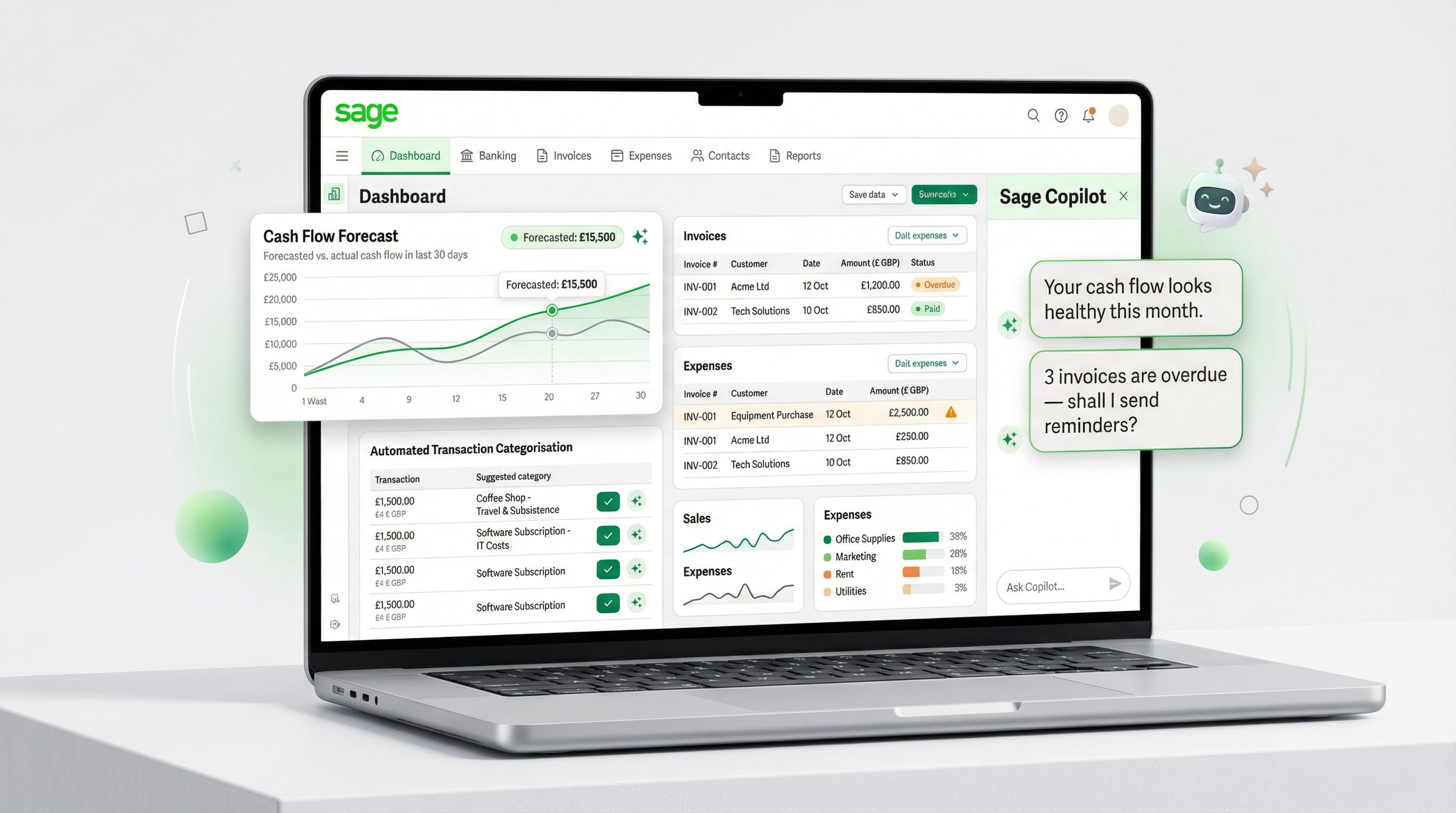
Copilot analyses your open invoices, upcoming bills, and historical patterns to give you a forward-looking cash position — not a static snapshot of today, but a projection of what's likely coming in and out over the next weeks.
Given that 42% of UK SMEs can't pay staff on time due to cash flow issues, this isn't a nice-to-have. Knowing two weeks ahead that you've got a gap gives you time to chase a payment, delay a purchase, or arrange a facility.
Worth knowing: Cash flow forecasting with custom scenarios is available on Standard (£39/month) and Plus (£59/month) plans. Start plan users get the basic forward-looking view but not the full forecasting toolkit.
Receipt Categorisation — Snap, Scan, Done
Snap a receipt on your phone. Copilot reads it, extracts the key info (supplier, amount, date, VAT), categorises it, and attaches it to the right transaction. It learns your patterns over time, improving with use.
No more shoeboxes of crumpled receipts. No more Saturday afternoons puzzling over what that £47.30 from three months ago was for.
VAT Compliance Alerts
If you're VAT-registered (or approaching the £90,000 threshold), Copilot tracks your obligations and sends deadline reminders well in advance. It monitors your turnover against the registration threshold and flags potential issues with your returns.
Sage claims a 75% time reduction on VAT-related admin. Your mileage will vary, but the directional benefit is real — especially if you've ever felt the sting of a late-filing penalty.
Time Savings Breakdown
Here's a summary of Sage's reported time savings for each Copilot feature. These figures come from Sage's published case studies and product data — your mileage may vary depending on your business size and volume of transactions.
Feature Hours Saved / Week Hours Saved / Month Invoice creation & email drafting 2.1 hrs ~8.4 hrs Payment chasing 2.1 hrs ~8.4 hrs Report automation & scheduling 1.9 hrs ~7.6 hrs Admin automation (AP, POs, supplier payments) 6.1 hrs ~24.4 hrs VAT compliance 75% time reduction — Anomaly detection Ongoing / proactive — Cash flow insights Ongoing / proactive — Receipt categorisation Varies by volume — Total (quantified features) ~12.2 hrs ~48.8 hrs
Nearly 49 hours a month. That's more than a full working week reclaimed every single month — just from the features Sage has put a number on. The proactive stuff (anomaly detection, cash flow alerts, receipt scanning) adds more on top.
Real Business Results
Numbers on a product page are one thing. What matters is whether actual businesses are seeing the benefit. Two case studies stand out.
Tyne Chease — 12 to 14 Hours per Week Saved
Tyne Chease is a small vegan cheese manufacturer based in the North East. They're a tiny team — the kind of business where the CEO also works in the kitchen and the general manager does everything from production planning to chasing invoices.
"Sage Copilot saves us 12 to 14 hours on average every week. That's a huge amount of time back for our team."
— Adam Williams, General Manager, Tyne Chease
Before Copilot, invoice chasing was their biggest admin headache. Adam describes how invoices were getting paid up to seven full days later than they needed to be. Now, he starts each morning with a Copilot summary of what's overdue, and it automatically drafts chase emails for him to review and send.
Victoria Inskip, Tyne Chease's CEO, puts it bluntly: "Every morning when I do admin, it's Sage Copilot. It's like my little personal assistant, telling me what needs addressing, what needs to be prioritised. It even drafts emails and suggests tones — friendly or firm."
The freed-up hours have had tangible knock-on effects — completing their first audit ("largely passed due to the time saved"), running cost reviews that brought prices down for customers, and focusing on scaling for supermarket opportunities they'd previously had to turn down.
Watsons Anodising — 5+ Hours per Week Saved
Watsons Anodising is a 67-year-old manufacturing business in Barnsley. Gareth, one of the owners, is a self-described early adopter who jumped on Sage Copilot as soon as it became available.
He uses Copilot to pull up purchase invoice insights instantly and automate receipt processing. "You upload them onto the system," Gareth explains. "It'll look at the supplier, match it to your system, fill in the amount, date, net and VAT. Then you can just quickly check and submit — which is brilliant."
The payment chasing has been equally valuable — "the reminder system sends out a reminder when each invoice is overdue," freeing up mental energy for running the actual business.
The pattern here: Both businesses saw the biggest impact from automated payment chasing. If you're currently spending any significant time manually emailing customers about overdue invoices, that's where you'll feel the benefit fastest with Sage Copilot.
Sage Copilot for Sole Traders
Until recently, Sage Copilot was only available in Sage Accounting (Start, Standard, and Plus plans). But in February 2026, Sage launched Copilot inside Sage Sole Trader — their free accounting app for non-VAT-registered sole traders.
The headline feature is the Payments Agent, and it's specifically designed to tackle the invoicing and late-payment crisis hitting sole traders hardest. Remember that £42,000 average in overdue invoices? That's across all small businesses — for sole traders working alone without a finance team, even a fraction of that can be devastating.
Here's what the Payments Agent does:
Create invoices by voice or text — dictate an invoice on your phone and Copilot builds it for you in seconds
Track invoice status — see at a glance what's been sent, viewed, paid, and overdue
Send payment reminders — automated chasing that you approve before it goes out
Pay Now button — your customers can pay instantly from the invoice itself (powered by Stripe), and incoming payments are automatically matched to the right invoices
Automatic transaction categorisation — AI sorts your income and expenses into the right categories for tax purposes
Early adopters of Copilot in Sole Trader report saving over 5 hours per week on manual tasks. That's remarkable for a free product.
Voice invoicing is genuinely useful. If you're a tradesperson on a job site, or a freelancer wrapping up a session with a client, being able to say "invoice John Smith, £450 for website design, due in 14 days" and have a proper invoice created and sent — that's a real workflow improvement. No more "I'll sort the invoicing tonight" that becomes next week.
What It Costs
Here's the bit that surprises most people: Sage Copilot is included free in every plan. From the free Sole Trader app right up to Plus at £59/month, you get Copilot at no additional charge. There's no AI add-on fee, no premium tier to unlock it, no "Copilot Pro" upsell.
The only additional cost to be aware of is for extra users. Sage Accounting plans come with a set number of user seats (1 for Start, 3 for Standard, unlimited for Plus), and if you need to add more on Start or Standard, additional users cost £20/month each.
The current pricing with promotional discounts:
Sole Trader (free): £0/month — non-VAT sole traders, Copilot with Payments Agent, 5 invoices/month
Individual Paid: £7/month (promo: £0.70/month for 12 months) — unlimited invoicing, AI categorisation
Start: £18/month (promo: £1.80/month for 6 months) — 1 user, VAT, payroll for 1 employee, full Copilot, MTD
Standard: £39/month (promo: £3.90/month for 6 months) — 3 users, CIS, custom reports, cash flow forecasting
Plus: £59/month (promo: £5.90/month for 6 months) — unlimited users, multi-currency, stock management
At promotional prices, you could be paying £1.80/month for the first six months of Start — getting full Copilot AI, VAT support, payroll, and MTD compliance for less than a coffee. Even at full price, £18/month for all of this is competitive.
Which Plan Includes What
Copilot Feature Start (£18/mo) Standard (£39/mo) Plus (£59/mo) Invoice drafting & email creation ✓ ✓ ✓ Payment chasing automation ✓ ✓ ✓ Anomaly detection ✓ ✓ ✓ Receipt categorisation ✓ ✓ ✓ Real-time financial alerts ✓ ✓ ✓ Natural language queries ✓ ✓ ✓ VAT compliance & threshold alerts ✓ ✓ ✓ Report automation & scheduling ✓ ✓ ✓ Admin automation (AP, POs) ✓ ✓ ✓ Custom reports & cash flow forecasting ✗ ✓ ✓ Budget vs actual analysis ✗ ✗ ✓ Multi-currency reports ✗ ✗ ✓ Users included 1 3 Unlimited
The core Copilot features — the stuff that saves you the most time — are identical across all three plans. The differences are in the broader Sage Accounting features (custom reports, forecasting, multi-currency), not in the AI itself.
How It Compares to the Competition
The obvious question: how does Sage Copilot stack up against what QuickBooks and Xero are offering?
QuickBooks: Finance AI
QuickBooks has Finance AI (previously Intuit Assist) — financial summaries, recommendations, and data analysis. Genuinely useful for performance summaries and budget comparisons.
The catch? Finance AI is only available on QuickBooks Online Advanced, around £115/month in the UK — more than six times Sage's Start plan where you get the full Copilot suite included. QuickBooks is rolling out basic AI features on lower tiers, but the full experience stays locked behind Advanced.
Xero: Work in Progress
Xero has JAX, its AI assistant, offering data capture, transaction categorisation, and anomaly detection. In February 2026, Xero announced improved AI-powered data extraction using large language models.
But compared to Copilot's proactive approach — drafting chase emails, automating admin workflows, cash flow projections, natural language queries — Xero's AI feels a step behind. There's no equivalent to Copilot's payment chasing or the Payments Agent. Xero remains excellent software, but on the AI front, Sage has moved further, faster.
The value gap in plain terms: Sage gives you a full AI assistant included from £18/month (or £1.80 in the promo period). QuickBooks locks its equivalent behind a £115/month plan. Xero doesn't yet have a directly comparable offering. If AI-powered automation is a priority for you, Sage is currently offering the most for the least.
What Sage Copilot Can't Do
Let's be balanced about this. Sage Copilot is genuinely impressive, but it's not magic, and Sage would be the first to tell you it's not designed to replace professional advice.
It's Not a Replacement for an Accountant
Copilot categorises transactions, flags anomalies, and generates reports. It can't give you strategic tax advice, interpret complex legislation, or represent you in an HMRC investigation. For day-to-day admin it's brilliant, but for year-end accounts, tax planning, and anything involving professional judgement, you still need a human.
AI Needs Human Review
Every action Copilot takes requires your approval — a design choice, not a limitation, and the right one. AI can misread a receipt, miscategorise something, or draft a chase email that's tonally off. You're always the one pressing "send" or "approve."
Copilot might flag a perfectly legitimate transaction as unusual because it lacks your context. Check its suggestions rather than blindly accepting them.
Early teething issues: In January 2025, Sage temporarily suspended Copilot after a bug caused it to display unrelated business information to a small number of users. The issue was resolved within hours and Sage confirmed no invoices or sensitive data were exposed. It's worth knowing about, though — and it reinforces why human oversight of AI outputs matters.
It Won't Fix Bad Data
Copilot works with the data you give it. If your bank feeds aren't connected, your categories are a mess, and your invoices are incomplete, Copilot's insights will reflect that garbage-in, garbage-out reality. The tool works best when your Sage Accounting setup is clean and current.
The Verdict
Sage Copilot isn't perfect. Categorisation occasionally misses, natural language queries can be hit-and-miss on complex questions, and new features are still being added regularly.
But here's the thing: it's included for free. You're not paying extra or gambling on an add-on. If you're on Sage Accounting, you've got it. And the time savings — even at half what Tyne Chease reports — are substantial.
"I know AI can be controversial. I'd never want it to replace the human aspect of a job. But it's a really good tool to enhance the work people are doing. It's a night-and-day difference."
— Victoria Inskip, CEO, Tyne Chease
The payment chasing alone is worth it. If 62.6% of UK invoices are being paid late and you're spending hours writing "just a gentle reminder" emails, Copilot automates that process while getting you paid a week faster.
For sole traders, the free Sage Sole Trader app with the Payments Agent is a no-brainer — voice invoicing, Pay Now button, automatic matching, all for £0/month.
And for small businesses on Start, Standard, or Plus, admin automation (6.1 hrs/week), payment chasing (2.1 hrs/week), and report scheduling (1.9 hrs/week) add up to real productivity gains your competitors simply won't have.
Is it the future of small business accounting? Probably. Is it there yet? Not entirely — but it's closer than anything else on the market, and it's available today at a price that's hard to argue with.
Disclaimer: This article contains affiliate links to Sage. If you sign up through our links, we may earn a commission at no extra cost to you. This doesn't influence our editorial opinions — we only recommend products we genuinely believe are useful. All pricing, features, and statistics are accurate as of March 2026. Sage Copilot features and availability may change — check the Sage website for the latest details. This article is for informational purposes only and does not constitute financial or tax advice. Always consult a qualified accountant for advice specific to your circumstances.