The 5 Financial Reports Every UK Small Business Should Review Monthly
Most small business owners only look at their numbers once a year — usually because HMRC forces them to. Here are the five reports that deserve your attention every single month, and what to actually look for when you open them.
Let's be honest. If you're running a small business in the UK, the phrase "financial reports" probably makes you want to close your laptop and go make a cup of tea. Maybe two cups. Maybe just never come back.
You're not alone. A huge number of small business owners treat their accounts like a mystery box that only gets opened at year-end, usually in a mild panic while their accountant sends increasingly firm emails. The day-to-day reality is chasing invoices, serving customers, and keeping everything moving — sitting down with a Balance Sheet feels like homework from a subject you never signed up for.
But here's the thing: the businesses that thrive are the ones where the owner actually knows what the numbers are telling them. Not once a year. Monthly.
The good news? You don't need an accounting degree. You just need to know which five reports to look at and what to look for. That's exactly what this guide covers.
The cost of flying blind: 42% of UK SMEs report they can't pay staff on time due to cash flow issues, and 62.6% of UK invoices were paid late last year. Most of these problems are visible in the reports below — weeks or months before they become crises.
Why Monthly? Because Yearly Is Too Late
Checking your financial reports once a year is like checking the fuel gauge only when the car stops moving. By that point, you're stranded on the hard shoulder.
Monthly reviews let you:
Spot cash flow gaps before they turn into missed payroll or bounced payments
Catch errors and fraud while they're still small and fixable
Understand seasonal patterns so you can plan ahead instead of reacting
Make informed decisions about hiring, spending, or investing
Reduce year-end stress because your records are already accurate and up to date
The average sole trader spends £753 per year on compliance. A big chunk of that comes from the year-end scramble — reconciling months of neglected records, chasing missing receipts, and paying your accountant to untangle the mess. Monthly reviews don't just give you better insight — they save you real money.
You don't need to become an accountant. You just need to become the kind of business owner who knows their numbers well enough to ask the right questions.

Your Five Essential Reports: The Overview
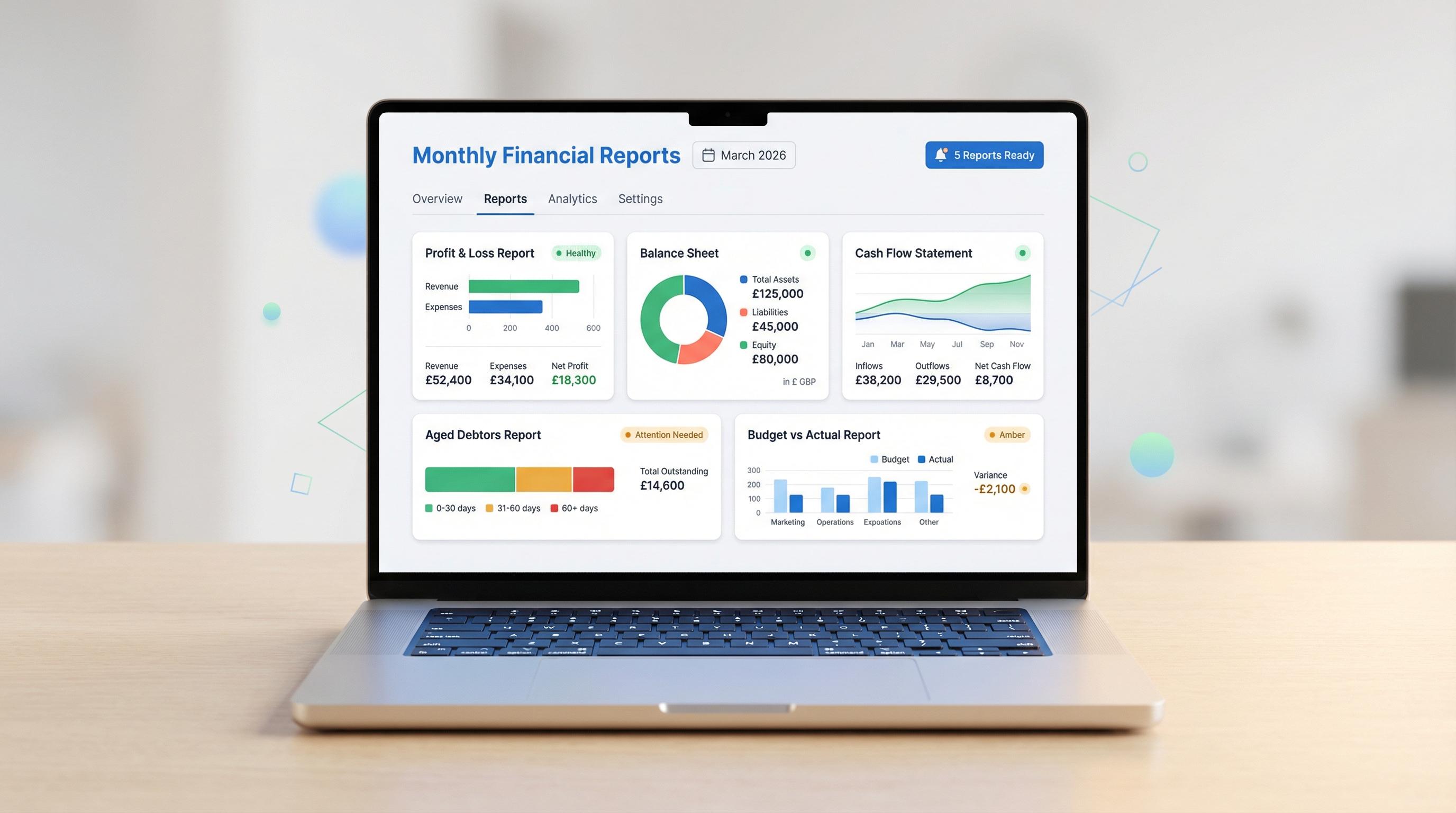
Here's a quick overview of all five reports before diving into the detail. Think of them as five different angles on the same business — like checking your mirrors before changing lane.
Report What It Tells You Key Question It Answers Profit & Loss (P&L) Revenue minus expenses over a period Am I actually making money? Balance Sheet What you own vs. what you owe What is the business actually worth right now? Cash Flow Statement Where cash came from and where it went Can I pay my bills next month? Aged Debtors Who owes you money, and how overdue it is Who hasn't paid me, and should I be worried? Bank Reconciliation Whether your records match your bank Are my books actually correct?
Now let's go through each one in detail. For every report, you'll get a plain-English explanation, what to look for, the red flags that should make you sit up straight, and how Sage Accounting can make the whole process considerably less painful.
Report 1: Profit & Loss (P&L) Statement
What it is, in plain English
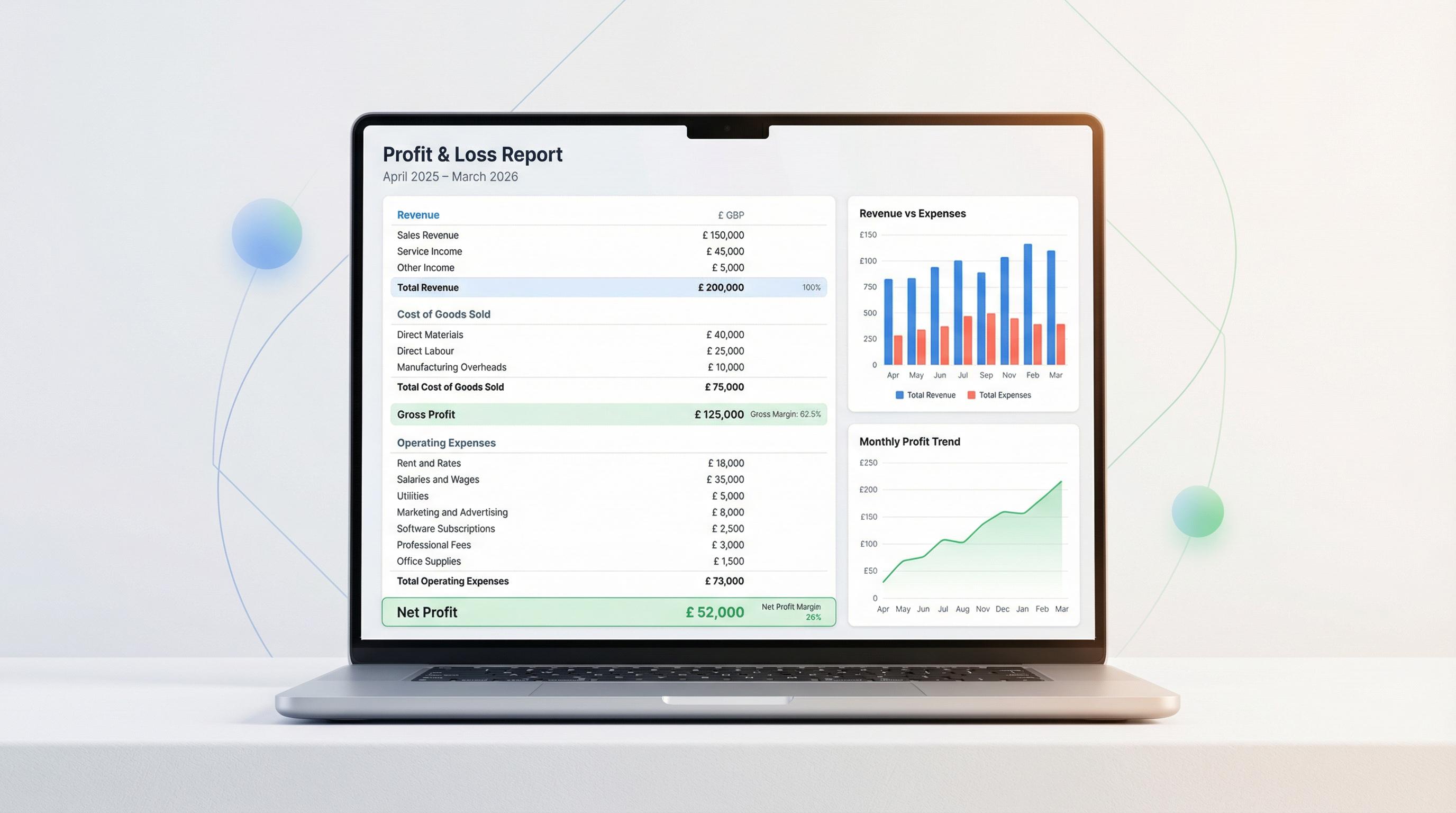
Your Profit & Loss statement (also called an income statement) is the simplest answer to the question: am I making money or losing it? It takes all your income for a period, subtracts all your expenses, and shows you what's left — your profit (or loss).
It covers a specific time window — typically a month, quarter, or year. For monthly reviews, look at the current month and compare it against previous months and the same month last year.
What to look for
Revenue trends: Is your income going up, down, or staying flat? Compare month-on-month and year-on-year.
Gross profit margin: This is your revenue minus the direct cost of delivering your product or service. If this margin is shrinking, your costs are rising faster than your prices.
Expense categories: Are any expense lines growing unexpectedly? Subscriptions, contractor costs, and materials are common culprits.
Net profit: The bottom line. After everything's paid, what's left? Is it enough to sustain the business and pay you?
Red flags
Revenue is growing but net profit is flat or falling (your costs are outpacing your sales)
A single expense category suddenly spikes without a clear reason
Gross margin drops below your industry average
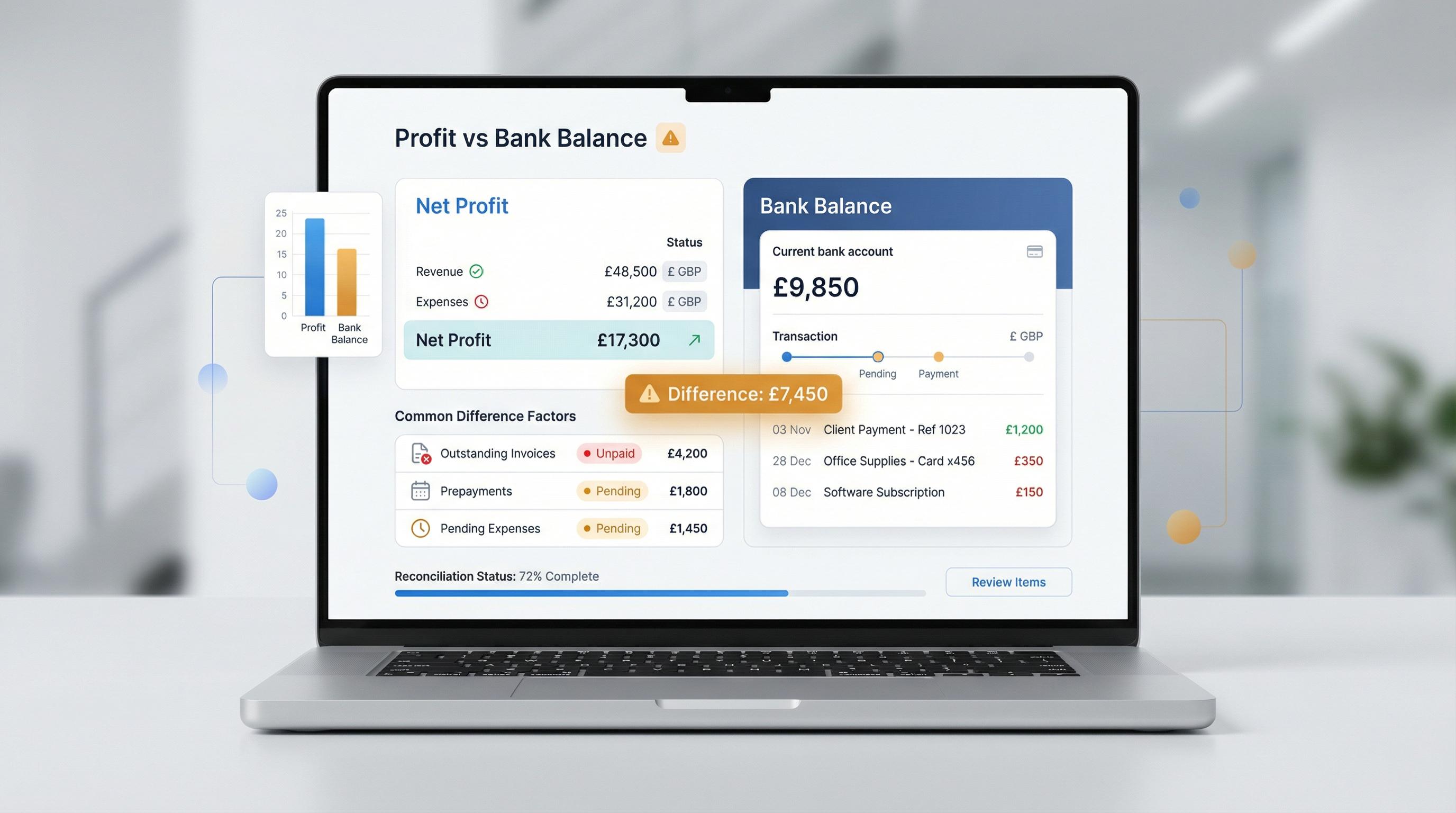
You're profitable on paper but struggling to pay bills (this means you need to look at cash flow — more on that below)
Sage tip: Sage Accounting generates your P&L automatically from your recorded transactions. On the Standard plan (currently £3.90/month for the first six months), you also get Budget vs Actual reporting — so you can set monthly targets and see exactly where you're over or under.
Report 2: Balance Sheet
What it is, in plain English
If the P&L is a video of how your business performed over time, the Balance Sheet is a photograph of where it stands right now. It shows three things:
Assets: everything the business owns (cash in the bank, equipment, money owed to you by customers, stock)
Liabilities: everything the business owes (loans, credit card balances, unpaid supplier invoices, tax owed to HMRC)
Equity: the difference — what the business is actually "worth" to its owners
The formula is always: Assets = Liabilities + Equity. If it doesn't balance, something's wrong with your bookkeeping.

What to look for
Current ratio: Divide your current assets (cash, debtors, stock) by your current liabilities (bills due within 12 months). Above 1.5 is comfortable. Below 1.0 means you technically can't cover your short-term debts.
Equity trend: Is the owner's equity growing over time? That's a sign of a healthy, strengthening business.
Debt levels: Are liabilities creeping up faster than assets? That's a trajectory you want to catch early.
Red flags
Current ratio dropping below 1.0
Equity turning negative (you owe more than you own)
Large, unexplained changes in any asset or liability account
Trade creditors (money you owe suppliers) growing much faster than trade debtors (money owed to you)
The Balance Sheet gets more intuitive each month you review it. The key is to watch the trends, not memorise the numbers.
Report 3: Cash Flow Statement
What it is, in plain English
This is arguably the most important report for a small business. Your P&L might say you're profitable, but profit doesn't pay bills — cash does. The Cash Flow Statement tracks actual money moving in and out of your business.
It's divided into three sections:
Operating activities: cash from your day-to-day business (customer payments in, supplier payments out)
Investing activities: cash spent on or received from assets (buying equipment, selling a vehicle)
Financing activities: cash from loans, repayments, or owner investments
Profit is an opinion. Cash is a fact. Many profitable businesses have gone under simply because the cash didn't arrive in time to pay the bills.
What to look for
Operating cash flow: Is your core business generating positive cash flow? This is the number that matters most. If you're profitable but operating cash flow is negative, you've got a timing problem.
Cash runway: At the current burn rate, how many months of cash do you have in reserve? Three months is a sensible minimum.
Payment timing gaps: Are you paying suppliers faster than customers are paying you? That gap is where cash flow problems live.
Red flags
Negative operating cash flow for two or more consecutive months
Cash balance declining each month even though the P&L shows a profit
Increasing reliance on financing (overdrafts, loans) to cover operating expenses
A single large customer representing a big chunk of your incoming cash
Cash flow forecasting: On the Standard and Plus plans, Sage includes cash flow forecasting, which projects your future cash position based on known income and expenses. It's like a financial weather forecast — not perfect, but a lot better than guessing.
Report 4: Aged Debtors Report
What it is, in plain English
This one's straightforward: it lists everyone who owes you money, how much they owe, and how long the invoice has been outstanding. It groups debts into time buckets — current, 1–30 days overdue, 31–60 days, 61–90 days, and 90+ days.
Given that 62.6% of UK invoices were paid late last year, this report isn't optional — it's essential.
What to look for
Total outstanding: How much money is sitting out there waiting to come in? Is that number growing?
Ageing distribution: What percentage of your debts are in the older buckets? You want the bulk of your outstanding invoices in the "current" or "1–30 days" columns.
Repeat offenders: Are the same customers consistently late? That's a pattern that needs addressing — either with stricter terms, upfront payments, or a difficult conversation.
Concentration risk: Does one customer owe you a disproportionate amount? If they go bust, can you survive it?
Red flags
More than 20% of your debts are in the 60+ days column
A large invoice has moved into the 90+ days bucket without any communication from the customer
Total debtors are growing faster than revenue (you're selling more but collecting less)
A previously reliable customer suddenly stops paying
Don't ignore aged debt. The older a debt gets, the less likely you are to collect it. Industry data suggests that once an invoice passes 90 days overdue, the probability of full collection drops below 70%. Chase early, chase firmly, and document everything.
Sage Accounting generates your Aged Debtors report automatically and lets you send payment reminders directly from the software — so chasing doesn't have to mean awkward phone calls every time.
Report 5: Bank Reconciliation
What it is, in plain English
Bank reconciliation is the process of comparing your accounting records against your actual bank statements to make sure they match. It's like cross-checking your shopping list against what actually ended up in the trolley.
This isn't a "report" in the traditional sense — it's a verification exercise. But it's one of the most important things you can do monthly, because everything else depends on your records being accurate.
What to look for
Unmatched transactions: Are there items on your bank statement that don't appear in your accounts? They need categorising.
Duplicate entries: Has a transaction been recorded twice? This is surprisingly common, especially if you're entering things manually alongside a bank feed.
Missing transactions: Are there items in your accounts that don't appear on the bank statement? They might be pending, entered in error, or relate to a different account.
The closing balance: After reconciliation, does your accounts balance match your bank balance? If not, something needs investigating.
Red flags
A persistent, unexplained difference between your books and your bank
Transactions you don't recognise (potential fraud or unauthorised payments)
The same discrepancy appearing month after month (a systemic error in your bookkeeping)
Bank charges or direct debits you weren't aware of
Sage tip: Sage connects to your bank via Open Banking and automatically imports transactions. Its reconciliation tool matches imported transactions against your records, flagging anything that doesn't line up. What used to take an afternoon now takes minutes.
What Each Report Tells You — At a Glance
Here's how the five reports work together. Each covers a different aspect of your business's financial health:
Report Looks At Time Scope Main Benefit Profit & Loss Profitability A period (month, quarter, year) Shows whether you're earning more than you're spending Balance Sheet Financial position A single point in time Shows what the business is worth and whether it's solvent Cash Flow Statement Liquidity A period (month, quarter, year) Shows whether you can actually pay your bills Aged Debtors Receivables A single point in time Shows who owes you money and whether it's at risk Bank Reconciliation Accuracy Up to statement date Confirms your books match reality
No single report tells the full story. A business can look profitable on the P&L while haemorrhaging cash. It can have a strong Balance Sheet but be owed thousands by customers who aren't paying. You need all five to get a genuine picture of where things stand.
Your Monthly Financial Review Checklist
Knowing which reports to review is one thing. Actually doing it consistently is another. Here's a checklist to follow. The whole process should take 30–60 minutes once you're in the habit.
Step Task Time 1 Reconcile your bank accounts — match transactions, categorise anything new, investigate discrepancies 10–15 min 2 Review your Aged Debtors — chase anything overdue, note any customers moving into older buckets 5–10 min 3 Check your P&L — compare to last month and same month last year, flag unusual expense lines 5–10 min 4 Review your Cash Flow Statement — check operating cash flow is positive, estimate your cash runway 5–10 min 5 Glance at your Balance Sheet — check current ratio, note any big changes in assets or liabilities 5 min 6 Note 2–3 actions — what needs doing based on what you've seen? Chase an invoice? Cut a subscription? Adjust pricing? 5 min
Set a recurring calendar appointment for the first week of each month. Treat it like a dentist appointment — not the most exciting hour, but you'll be glad you didn't skip it.
How Sage helps you stick to the routine: Every one of the five reports above is available in all Sage Accounting plans — including the free Individual plan. The data updates in real time as you record transactions and reconcile your bank. There's no exporting spreadsheets, no manual calculations. You open the report, and it's there. On the Standard plan (currently 90% off at £3.90/month for six months), you also get cash flow forecasting and budget vs actual comparisons, which make this monthly routine even more powerful.
Common Mistakes to Avoid
Even once you start reviewing these reports monthly, there are a few traps worth watching out for:
Only looking at the P&L. Profit is important, but it's not the whole picture. Cash flow and debtors deserve equal attention.
Reviewing but not acting. The point of looking at the numbers isn't to feel informed — it's to make better decisions. Every review should end with at least one concrete action.
Comparing the wrong periods. Don't just compare to last month — compare to the same month last year. Seasonal patterns can make month-on-month comparisons misleading.
Ignoring small discrepancies in reconciliation. A £20 mystery difference might seem trivial, but it could be the tip of a bigger problem. Investigate everything.
Waiting until things feel wrong. The whole point of monthly reviews is to catch problems when they're small. If you only look when something feels off, you've missed the window for early intervention.
But I've Got an Accountant — Do I Still Need to Do This?
Yes. Absolutely yes.
Your accountant is brilliant at what they do — compliance, tax planning, year-end accounts. But they typically see your numbers quarterly or annually, and they're looking at the past. You're the person running the business right now.
Monthly reviews don't replace your accountant — they complement them. You'll arrive at your next meeting with better questions, a clearer understanding of your position, and fewer expensive surprises. Most accountants will actively thank you for it.
Plus, keeping records clean monthly means less cost at year-end. That £753 average compliance cost for sole traders? You can chip away at it significantly by staying on top of things throughout the year.
Getting Started: Make It Stupidly Simple
The biggest barrier to monthly reviews isn't knowledge — it's friction. If pulling a report takes 20 minutes of exporting and fiddling with spreadsheets, you won't do it. Nobody would.
That's why the right software matters. You need something that:
Connects to your bank and imports transactions automatically
Generates all five reports with a couple of clicks
Updates in real time so the data is always current
Doesn't require you to be an accountant to understand what you're seeing
Sage Accounting does all of this. Every plan — including the free Individual tier — includes Profit & Loss, Balance Sheet, Cash Flow Statement, Aged Debtors, and Bank Reconciliation. If you want extras like cash flow forecasting or budget vs actual tracking, the Standard plan is currently available at 90% off (£3.90/month for your first six months).
The goal is to remove every excuse between you and a 30-minute monthly review. Once the software handles the heavy lifting, all you need to bring is curiosity.
The Bottom Line
Five reports. Thirty minutes a month. That's all it takes to go from flying blind to flying informed.
You don't need to love numbers. You just need to open these five reports once a month, look at the trends, ask yourself "does anything here surprise me?", and take action where needed.
The businesses that survive tough times — and thrive in good ones — are the ones where the owner knows their numbers. Not perfectly. Just well enough to steer confidently.
Start this month. Block out an hour. Open the reports. You might be surprised by how much clearer everything feels when you actually know where you stand.
This article contains affiliate links. If you sign up to Sage through our links, SmallBiz Desk may earn a small commission at no extra cost to you. This helps fund our free content. All recommendations are genuine — these are tools the editorial team has personally evaluated and believes are a good fit for UK small businesses.